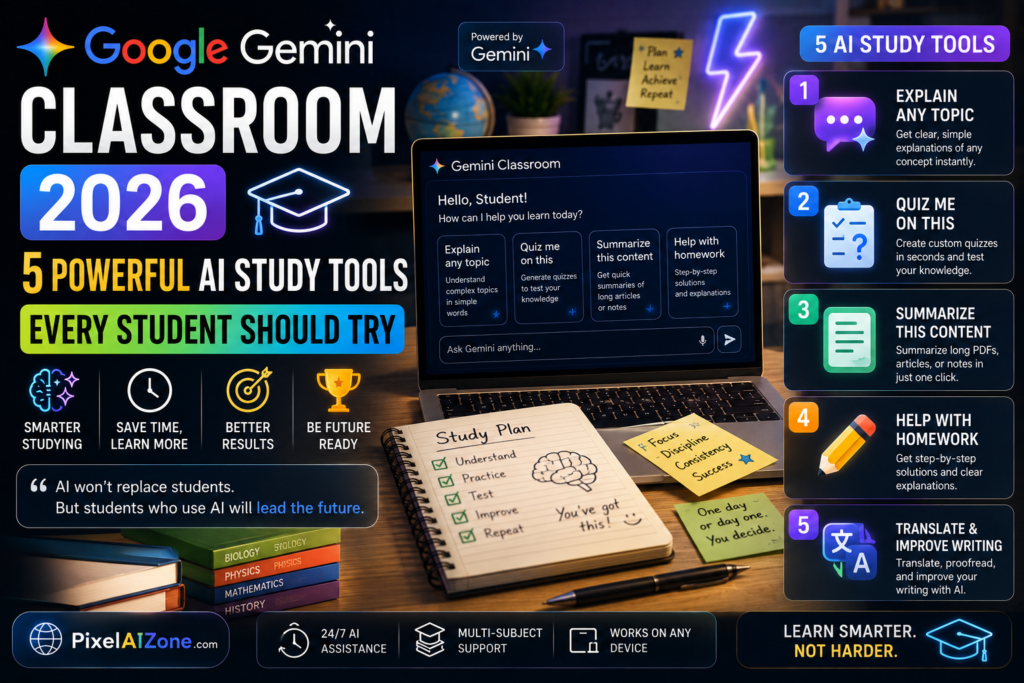
Google is bringing AI-powered study tools to students of all ages. Here’s what’s changing in your classroom — and why it matters. Google Gemini Classroom is transforming how students learn with AI-powered study tools in 2026.
Let me show you something.
On August 10, 2026, Google made a move that will affect over 150 million students and teachers worldwide . The company expanded Gemini in Google Classroom to K-12 and higher education students of all ages — not just those 18 and older .
For the first time, students can access AI-powered study guides, practice quizzes, flashcards, and interactive learning tools directly inside Google Classroom, without leaving the platform . The AI is now contextual — it understands specific assignments, teacher instructions, and curriculum materials .
Here’s what this means for students, teachers, and schools.
Google Gemini Classroom is bringing AI-powered study guides to students of all ages.
Table of Contents
- What’s New in Google Gemini Classroom
- How Students Can Use Gemini Study Tools
- The “Learn with Gemini” Feature
- Study Notebooks: Personalized Learning
- What Teachers Need to Know
- Privacy and Control
- FAQ
What’s New in Google Gemini Classroom
Understanding Google Gemini Classroom starts with knowing what’s new in the platform.
Until August 2026, Gemini in Google Classroom was only available to teachers and higher education students 18 and older . Google has now opened it to K-12 and higher education students of all ages, provided their school administrator has enabled access .
Key changes:
| Feature | What It Does |
|---|---|
| Gemini tab | Students get a dedicated AI study space inside Classroom |
| Contextual prompts | AI understands specific assignments and materials |
| Learn with Gemini | Quick AI help appears when hovering over assignments |
| Gemini Notebook sync | Study guides sync with NotebookLM for deeper learning |
The most important update: Starter prompts on the student Gemini tab can now use context from Google Classroom to tailor interactions specifically to students’ schoolwork . When a student clicks on a prompt, they can select a specific class and assignment — the AI then incorporates the title, instructions, and curriculum materials as context .
Students no longer need to repeatedly copy and paste assignment details into Gemini. The AI already understands their academic context .
How Students Can Use Gemini Study Tools
Students can use Google Gemini Classroom to create flashcards and practice quizzes.Google Gemini Classroom offers students a dedicated AI study space inside the platform.

Students with access to Gemini in Google Classroom can transform their class materials into interactive study aids .
What students can create:
| Tool | What It Does |
|---|---|
| Flashcards | Turn class notes into study cards |
| Practice quizzes | Generate quizzes based on coursework |
| Interactive study guides | Create comprehensive review materials |
| Audio overviews | Listen to summaries of class content |
| Infographics | Visual summaries through Gemini Notebook |
Students with Gemini Notebook access can sync teacher-provided materials directly to Gemini Notebook, enabling them to create interactive study guides, audio overviews, and infographics without uploading files manually .
The “Learn with Gemini” Feature
The Learn with Gemini feature is a key part of Google Gemini Classroom. Google Gemini Classroom syncs with NotebookLM for deeper learning and study tools.

A new feature called “Learn with Gemini” appears on the redesigned Classroom homepage .
How it works:
When students hover over any assignment in the “Due Soon” section, they see the “Learn with Gemini” option . Selecting it provides:
- Guided help with assignments
- Personalized study guides
- Practice quizzes
- Flashcards
- Step-by-step learning support
All content is based on the student’s actual class curriculum, not generic information .
Study Notebooks: Personalized Learning
Study notebooks make Google Gemini Classroom a personalized learning platform.
Beyond Classroom, Google is rolling out study notebooks in the Gemini app — a dedicated workspace that turns Gemini into an interactive, adaptive learning platform .
How study notebooks work:
- Students type a prompt or upload class materials
- Gemini creates a diagnostic quiz to identify knowledge gaps
- The AI builds a plan of personalized, bite-sized lessons
- As students track progress, lessons automatically update
“Students who’ve tested study notebooks praised it for helping them identify knowledge gaps, engage in active recall, and ultimately make their test preparation more effective” .
Key features:
- Syncs with NotebookLM for flashcards, infographics, and audio overviews
- Available to personal accounts globally; coming to school-issued accounts soon
- Students can upload specific class materials or type a study goal to start
What Teachers Need to Know
Teachers and administrators control access to Google Gemini Classroom.
Built for All Ages — but Controlled by Admins
Google has turned on Gemini in Classroom by default for students of all ages, but access is controlled by school administrators . If your school has not enabled Gemini for students, nothing changes .
What administrators control:
- Whether Gemini in Classroom is On or Off for all students
- Access for specific groups (e.g., younger students)
- Whether students can use Gemini Notebook or the Gemini app
Administrators can disable Gemini specifically for users under 18 by placing them in a separate Organizational Unit .
Teacher-Led AI Activities (Coming Soon)
Google will soon allow teachers to assign teacher-led AI activities directly within Google Classroom for Guided Learning, study notebooks, and NotebookLM .
Teachers will get insights into where the class or individual students might need extra help — so everyone is better prepared for the next exam .
Student Data Protection
Student data is encrypted and never used to train public AI models . All interactions stay within the organization’s data boundaries .
Standardized Test Prep
Google has partnered with The Princeton Review to offer full-length, no-cost practice ACT and GRE tests directly in Gemini . Support for SAT and Brazil’s Akira ENEM tests is also coming .
Privacy and Control
What Schools Control
| Control | How It Works |
|---|---|
| Enable/disable | Admins turn Gemini on/off at OU or group level |
| Age restrictions | Separate controls for under-18 students |
| Feature-specific | Gemini and Gemini Notebook controlled independently |
What Google Says About Data
- Student data is encrypted
- Interactions stay within organization’s data boundaries
- Data is never used to train AI models
- AI outputs should always be reviewed
FAQ
Q: When did Gemini in Classroom expand to younger students?
A: The expansion began on August 10, 2026, with mobile support starting August 17, 2026 .
Q: Can students use Gemini for free?
A: Yes, if their school has enabled access. It’s available at no additional cost through Google Workspace for Education Fundamentals, Standard, and Plus .
Q: What can students create with Gemini in Classroom?
A: Flashcards, practice quizzes, interactive study guides, audio overviews, infographics, and more .
Q: Do students need to leave Classroom to use Gemini?
A: No. The Gemini tab is inside Google Classroom, and “Learn with Gemini” works directly on the Classroom homepage .
Q: Can administrators restrict access for younger students?
A: Yes. Administrators can disable Gemini specifically for users under 18 by placing them in a separate Organizational Unit .
Q: Is student data safe?
A: Yes. Student data is encrypted, never used to train public AI models, and stays within the organization’s data boundaries .
Q: What is Google Gemini Classroom?
A: An AI-powered study tool for students.
Final Thoughts
Google’s expansion of Gemini in Classroom to students of all ages marks a significant shift in how AI is integrated into education.
The key message from Google: AI should be a guided, contextual tool that helps students learn — not a replacement for thinking. The company has emphasized that students should always review AI-generated content and verify information .
What’s clear:
- AI-powered study tools are now available to students of all ages
- The tools are contextual — they understand specific assignments
- Teachers and administrators maintain control over access
- Student data is protected and never used for training
Whether you’re a student, teacher, or parent, one thing is certain: AI is now a permanent part of the classroom.
Google Gemini Classroom is making AI-assisted learning accessible to all students. Google Gemini Classroom is a game-changer for personalized education in 2026.
Related Posts on Pixelaizone
- “AI in Pakistan Education 2026: A Complete Guide to the Future of Learning (Amazing Transformation)”
- The AI Cheat Sheet 2026: 50+ Tools, Major Trends, and What’s Next
What do you think about AI in the classroom? Drop a comment below!