You don’t need to be a developer to build your first AI agent. Here’s exactly how to start in 2026.
Let me show you something.
Every enterprise technology cycle produces a term that gets stretched until it means almost nothing. In 2026, that term is “agentic AI.” Vendors have rebadged chatbots, RPA scripts, and workflow automators as “agents,” and boardrooms are now asking CTOs the same blunt question: Are we actually running autonomous systems, or did we just rename our existing automation stack?
The honest answer sits somewhere in the middle. Building AI agents requires understanding the difference between a tool that answers questions and a system that takes action . This guide will show you exactly how to build AI agents from the ground up—no prior experience required.
Table of Contents
- What Is an AI Agent?
- Why Build AI Agents?
- Before You Start: What You Need
- Step 1: Choose Your Agent Framework
- Step 2: Set Up Your Development Environment
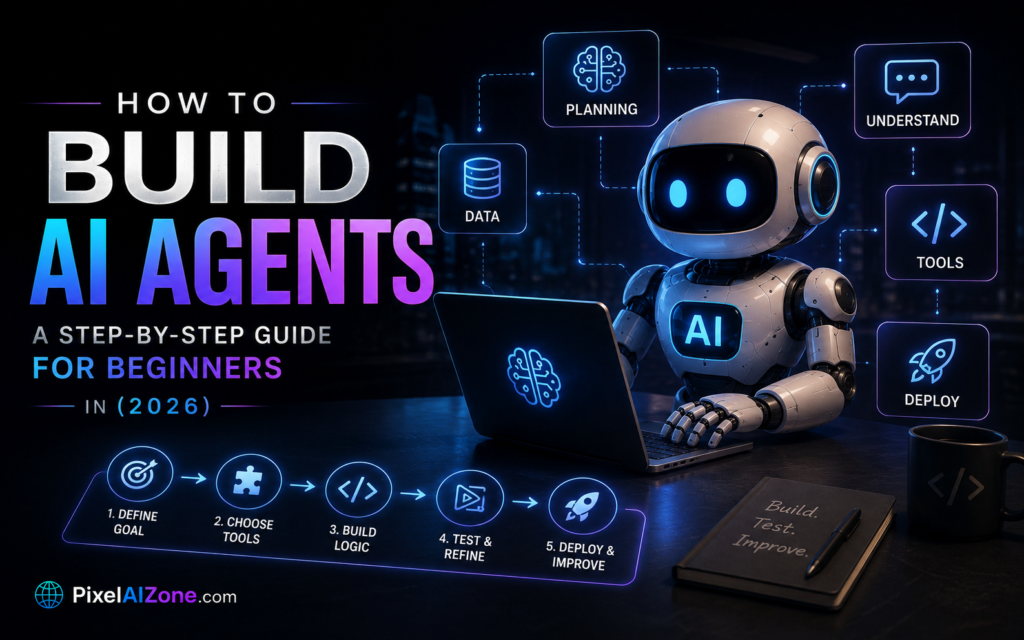
- Step 3: Design Your Agent’s Workflow
- Step 4: Build Your First Agent
- Step 5: Connect Your Agent to Tools
- Step 6: Test and Refine
- Step 7: Deploy Your Agent
- Best Practices for Building AI Agents
- FAQ
What Is an AI Agent?
How to build AI agents starts with understanding what they actually are.

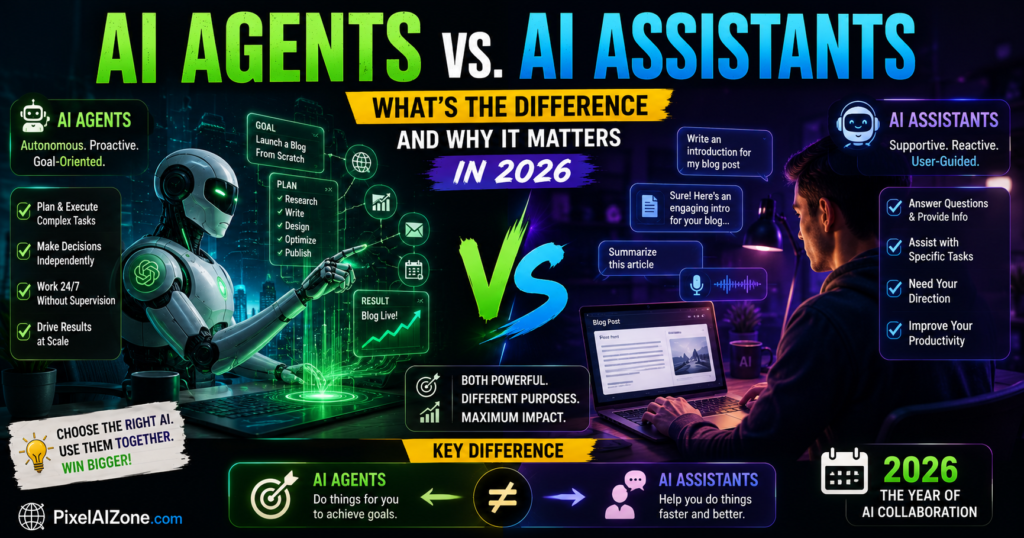
Building AI agents starts with understanding what they actually are. An AI agent is a system that can perceive its environment, reason about goals, plan a sequence of actions, and execute them with limited human supervision. Unlike a chatbot that responds once to a prompt, an agent works toward an objective over multiple steps.
The distinction matters: a chatbot that answers a policy question is generative AI. A system that reads an invoice, checks it against a purchase order, flags a discrepancy, drafts a query to the vendor, and routes it for approval—without a human triggering each step—is an agent.
Key characteristics of true AI agents:
- Plans sequences of steps
- Calls tools and APIs
- Evaluates intermediate results
- Adjusts approach with limited human supervision
- Takes action in production systems
Before you learn how to build AI agents, you need to understand what makes them different from the tools you already use.
Agentic AI in 2026: From Pilots to Production Revolutionary Guide
Why Build AI Agents?
Learning how to build AI agents has become one of the most valuable skills in 2026.

Building AI agents has become one of the most valuable skills in 2026. Here’s why:
| Reason | Impact |
|---|---|
| Automation of repetitive tasks | Free human workers for higher-value work |
| 24/7 operation | AI agents never sleep, never take breaks |
| Scalability | One agent can handle thousands of tasks simultaneously |
| Cost reduction | Reduce operational costs by automating routine workflows |
| Consistency | AI agents follow defined rules and processes every time |
According to Gartner, 40% of enterprise applications will embed task-specific AI agents by the end of 2026, up from under 5% just a year earlier . Now is the time to learn how to build AI agents.
Before You Start: What You Need
Before you start how to build AI agents, gather these prerequisites.
Building AI agents does not require a computer science degree. However, you do need:
Technical Requirements:
- A computer with internet access
- Basic understanding of APIs (what they are and how they work)
- Familiarity with JSON (optional but helpful)
- A code editor (VS Code recommended)
- An API key from an LLM provider (OpenAI, Anthropic, or Google)
Non-Technical Requirements:
- Clear understanding of the task you want to automate
- Patience for testing and iteration
- Willingness to experiment
Cost Considerations:
- Most frameworks are free and open-source
- API costs range from $0.002 to $0.05 per 1,000 tokens depending on the model
- You can start building AI agents with less than $10 in API credits
Before you start building AI agents, gather these prerequisites.
Step 1: Choose Your Agent Framework
The first step in how to build AI agents is choosing the right framework.

The first step in how to build AI agents is choosing the right framework. In 2026, several options are available for beginners:
| Framework | Best For | Learning Curve | Key Feature |
|---|---|---|---|
| OpenClaw | Developers, open-source | Medium | 250,000+ GitHub stars, most popular agent framework |
| LangChain | Production deployments | Steep | Enterprise-ready, extensive integrations |
| CrewAI | Multi-agent systems | Medium | Role-based agent design |
| AutoGen | Research and experimentation | Medium | Microsoft-backed, flexible |
| Zapier AI | No-code builders | Low | Visual interface, minimal coding |
For beginners, OpenClaw is the strongest recommendation. It is open-source, well-documented, and built specifically for building AI agents without needing to understand complex agent architectures . OpenClaw proves that a capable agent doesn’t require a massive team or complex infrastructure—one person can build something that works .
When building AI agents for the first time, start with OpenClaw.
Step 2: Set Up Your Development Environment
Setting up your environment is the first practical step in how to build AI agents.

Before you can start building AI agents, you need to set up your environment:
For OpenClaw (Recommended):
- Install Node.js (version 18 or higher) from nodejs.org
- Install Git from git-scm.com
- Open your terminal and clone the OpenClaw repository:bashgit clone https://github.com/openclaw/openclaw.git
- Navigate to the directory:bashcd openclaw
- Install dependencies:bashnpm install
- Create a
.envfile and add your API keys:textOPENAI_API_KEY=your-key-here ANTHROPIC_API_KEY=your-key-here - Run the development server:bashnpm run dev
For No-Code Builders (Zapier AI):
- Create a Zapier account
- Navigate to the AI section
- Click “Create Agent”
- Describe what you want your agent to do in plain English
- Connect your tools (Gmail, Slack, Google Sheets, etc.)
- Review and publish
Setting up your environment is the first practical step in how to build AI agents.
Step 3: Design Your Agent’s Workflow
Good workflow design is essential when building AI agents.

Before writing any code, design what your agent will do. Good agents are designed around a clear task:
Design Template:
- Define the Goal: What is the agent supposed to achieve?
- Break Down the Workflow: What steps are needed to achieve the goal?
- Identify Decision Points: Where does the agent need to make choices?
- Define Tool Requirements: What tools, APIs, or data sources will the agent need?
- Set Success Criteria: How will you know if the agent is working correctly?
Example: Customer Support Agent
- Goal: Resolve customer refund requests
- Workflow:
- Read customer message
- Verify customer identity
- Check order status
- Determine refund eligibility
- Process refund if eligible
- Notify customer
- Tools: CRM API, Order Management System, Email API
- Success Criteria: 80% of requests resolved without human intervention
Good workflow design is essential when building AI agents.
Microsoft Scout: The AI Agent That Never Sleeps and Does Your Busy Work 2026
Step 4: Build Your First Agent

Here is a simple OpenClaw agent that can research a topic and summarize it:
javascript
import { OpenClaw } from 'openclaw';

const agent = new OpenClaw({
  model: 'gpt-4',
  tools: {
    webSearch: true,
    summarizer: true
  }
});

// Define the agent's task
const task = "Research the latest advancements in agentic AI for 2026 and provide a 3-paragraph summary.";

// Run the agent
const result = await agent.run(task);
console.log(result.output);
What this code does:
- Imports the OpenClaw library
- Creates an agent instance with GPT-4 and web search tools
- Defines a task for the agent to complete
- Runs the agent and logs the output
This is the simplest way to build AI agents. The agent handles the reasoning, planning, and execution behind the scenes.
For a no-code version:
- Open Zapier AI
- Type: “Research the latest advancements in agentic AI for 2026 and provide a 3-paragraph summary”
- Select the tools you want the agent to use (web search, summarizer)
- Click “Run Agent”
Both approaches teach you how to build AI agents.
Step 5: Connect Your Agent to Tools
Tools are what make agents useful. Here’s how to connect your agent to real-world systems:
Tool Integration Pattern:
javascript
agent.addTool({
  name: 'sendEmail',
  description: 'Sends an email to a specified address',
  parameters: {
    to: { type: 'string' },
    subject: { type: 'string' },
    body: { type: 'string' }
  },
  execute: async ({ to, subject, body }) => {
    // Send email using your preferred service
    const result = await emailService.send({
      to,
      subject,
      body
    });
    return result;
  }
});
Common Tools for Beginners:
- Email: Gmail API, SendGrid, Resend
- Calendar: Google Calendar API
- Documents: Google Docs API, Notion API
- Messaging: Slack API, Discord API
- Data: SQL databases, Airtable, Google Sheets
- Web: Web scraping, Search APIs
Connecting tools to your agent is a critical skill in building AI agents.
Step 6: Test and Refine
The most important part of building AI agents is testing and refinement. Agents rarely work perfectly on the first try.
Testing Checklist:
| Test Type | What to Check |
|---|---|
| Accuracy | Is the agent producing correct information? |
| Reliability | Does the agent consistently complete the task? |
| Speed | How long does the agent take to complete the task? |
| Cost | How many tokens does the agent use per task? |
| Edge Cases | How does the agent handle unusual inputs? |
Refinement Techniques:
- Prompt Engineering: Adjust the instructions you give the agent
- Tool Selection: Add or remove tools based on what the agent actually uses
- Error Handling: Add retry logic for failed API calls
- Human-in-the-Loop: Add approval steps for critical actions
Test your agent at least 10 times with different inputs before deploying it. This is how you build AI agents that actually work.
Step 7: Deploy Your Agent
Once your agent is working, deploy it so it can run autonomously:
Deployment Options:
| Option | Best For | Setup Difficulty |
|---|---|---|
| Local Server | Testing and development | Low |
| Cloud Server (AWS, GCP) | Production workloads | Medium |
| Serverless (Vercel, Railway) | Simple agents | Low |
| Enterprise Platform | Large-scale deployments | High |
Minimum Viable Deployment:
- Host the agent: Use Railway (free tier) to host your agent code
- Set up a trigger: Connect the agent to a webhook or schedule it to run
- Monitor: Track agent runs, errors, and costs
- Iterate: Refine based on real usage
Deployment is the final step in how to build AI agents.
Best Practices for Building AI Agents
Based on real-world enterprise deployments, these practices separate successful agents from failed pilots:
1. Start with a Narrow Use Case
Do not try to build a general-purpose agent. Start with one well-defined task and expand gradually. The most successful agents are built around specific, bounded workflows.
2. Design for Observability
Every decision your agent makes should be logged. You cannot improve what you cannot see. The teams that ship agents all built observability into their first version, not as an afterthought.
3. Name an Owner Before Launch
Organizations with a single named, budgeted owner for an agent convert to production at a meaningfully higher rate. Diffuse ownership means nobody is accountable when something breaks.
4. Define Graduation Criteria Before You Start
The teams that ship all established their baseline metrics before the pilot began, not after. They knew what task completion rate, latency, and error distribution looked like without the agent, so they had a clear empirical answer to the question that kills most pilot reviews: “But is this actually better?”
5. Build Governance Alongside, Not After
Audit logging, human-in-the-loop points, and rollback designed into the first version. This is cheaper to build in than bolt on, and it converts risk teams from blockers into co-signers.
6. Scale in Stages
Start with bounded tasks behind approval gates and rollback paths. Widen autonomy only when the controls are proven. The 22% of deployments reporting negative ROI at 12 months are disproportionately those that skipped staged deployment.
7. Treat Every Agent as a Governed Identity
Give it unique credentials, least privilege, full logging, and a named owner who manages its lifecycle. Forrester’s advice is direct: “Treat every agent as a governed identity.”
FAQ
Q: Do I need to know how to code to build AI agents?
A: No. No-code platforms like Zapier AI allow you to build agents using plain English. For more advanced agents, basic coding knowledge is helpful but not required.
Q: How long does it take to build an AI agent?
A: A simple agent can be built in under an hour using OpenClaw or Zapier AI. More complex agents can take weeks to refine.
Q: How much does it cost to build AI agents?
A: Most frameworks are free and open-source. API costs range from $0.002 to $0.05 per 1,000 tokens. You can start building AI agents with less than $10 in API credits.
Q: What’s the difference between an AI assistant and an AI agent?
A: An assistant responds to prompts. An agent acts on goals—it plans, reasons, and executes tasks without constant human supervision.
Q: Is building AI agents worth it?
A: Yes. Gartner expects 40% of enterprise applications to embed AI agents by the end of 2026. Building AI agents is becoming one of the most valuable skills in the workforce.
Q: What are the risks of building AI agents?
A: The primary risks are security (over-permissioned agents, prompt injection) and governance (unclear ownership, lack of audit trails). These risks can be mitigated with proper controls.
Q: What is the easiest way to build AI agents for a beginner?
A: OpenClaw for developers and Zapier AI for no-code builders are the easiest entry points. Both have extensive documentation and active communities.
Final Thoughts
Building AI agents has become one of the most valuable skills in 2026. The technology is here. Long-running agents are no longer theoretical—OpenAI, Cursor, and Anthropic have demonstrated agents operating for days or months.
What you’ve learned:
- What AI agents are and why they matter
- How to choose the right framework for your needs
- How to design, build, test, and deploy your first agent
- Best practices for production-ready agents
Your next step:
- Choose a simple task to automate
- Pick a framework (OpenClaw recommended)
- Build your first agent today
- Test it, refine it, and deploy it
- Expand to more complex agents over time
The gap between AI pilots and production is the defining enterprise challenge of 2026. Now you know how to build AI agents that bridge that gap.
Related Posts on Pixelaizone
- Agentic AI in 2026: From Chatbots to Digital Workers Revolutionary Shift
- “The Rise of AI Agents: 5 Powerful Tools That Actually Do Work for You”
What AI agent are you planning to build first? Drop a comment below!