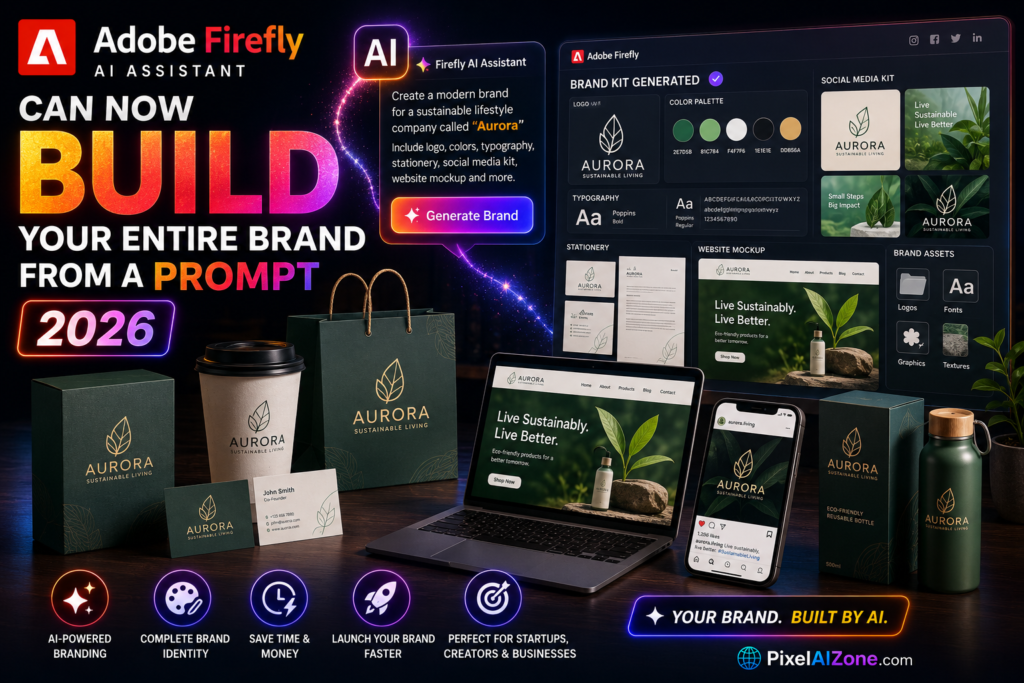
The creative assistant is evolving from a tool that helps you create into a system that can build your entire brand identity from a single conversation.
Let me show you something.
Adobe Firefly AI Assistant, an AI agent first unveiled as a public beta in April 2026, can now generate a complete brand kit — including logo, color palette, fonts, and brand guidelines — simply from a description of your brand name and style . Powered by Adobe’s creative agent system, it orchestrates multi-step workflows across Photoshop, Illustrator, Firefly, and other Creative Cloud apps .
What used to require hiring a designer or spending hours in multiple apps can now be described in a sentence and executed in minutes .
Adobe Firefly AI Assistant brand features are transforming how solopreneurs and small businesses create identity.
Table of Contents
- What the Brand Kit Creation Feature Does
- How to Build a Brand with Firefly AI Assistant
- Workflow in Action: From Product Photo to Brand Package
- Beyond Branding: Expanded Capabilities
- The Bigger Picture: Agentic Creativity Comes to Adobe
- What This Means for Designers and Business Owners
- FAQ
What the Brand Kit Creation Feature Does
The Adobe Firefly AI Assistant brand kit feature is part of a library of pre-built workflows called Creative Skills.

Adobe Firefly AI Assistant brand creation is redefining how small businesses approach identity design.
Adobe’s Firefly AI Assistant can now generate a full set of brand identity materials — including logos, a custom color palette, brand guidelines, and promotional videos — from a single conversational prompt (with as many follow-ups as needed) .
This is part of a library of pre-built workflows called Creative Skills — purpose-built for solopreneurs, social creators, and small business owners . Other Creative Skills in the expanded library include short product video creation, Quick Cut for automatic video assembly, and storyboard-to-video generation .
The assistant’s brand-building capabilities are built into the Firefly web app and accessible through a natural language chat interface. It works like an AI project manager, letting you describe what you want and handling the execution across multiple tools automatically . However, users are notified that the assistant is in beta and some features remain under development .
How to Build a Brand with Firefly AI Assistant
With Adobe Firefly AI Assistant brand creation, users can generate logos, color palettes, and fonts from a single prompt.
Adobe Firefly AI Assistant brand creation is part of a library of pre-built workflows called Creative Skills.
According to Adobe’s official Firefly AI Assistant guide, you can create a complete brand package in a few simple steps within a single chat conversation :
Before You Start:
- A Firefly account with access to the beta
- Product photos in JPG or PNG format
- A brand name and overall aesthetic direction (e.g., “Rustic and natural” or “Bold and modern”)
Step 1: Retouch Product Photos
- Upload product photos from multiple angles to help the assistant provide more accurate recommendations
- Describe desired edits, such as “Edit these photos to have consistent studio lighting. Preserve the aesthetic and do not increase color saturation.”
- Review the proposed plan or preset options, confirm desired changes, and save the edited images
Step 2: Create Brand Identity Elements
- In the same chat, enter a prompt like “I would like to create a brand for my jewelry business”
- Provide the brand name and description of the brand’s style or personality, including tagline, aesthetic, and core values
- Allow the assistant to create brand elements including brand colors, fonts, logo, and imagery guidelines
- Review suggested color directions, select from available color palettes, and request refinements like “I don’t like the suggested colors, make the palette more neutral”
- If logo concepts aren’t automatically generated, ask the assistant: “Create a logo concept”
- Refine results: “I like option 2, but add a terracotta element to the background”
- The assistant automatically saves the following to your Creative Cloud brand: logos, color samples and palettes, fonts, and voice, tone, photography, and channel guidelines
Step 3: Generate Packaging Mockups
- Once the logo, typography, and color palette are complete, enter a prompt to generate branded mockups: “Make a packaging mockup for jewelry linked to my brand”
- Review suggested types and the pilot mockup
- If the pilot meets expectations, select “Continue” to generate the remaining mockups
- Suggest changes if needed — the assistant automatically saves packaging and product mockups organized in Boards
Workflow in Action: From Product Photo to Brand Package
Adobe Firefly AI Assistant brand workflows compress entire product launches into one conversation.

Adobe Firefly AI Assistant brand workflows are already being used by creators to launch products faster.
Creator demos shared by Adobe Ambassadors illustrate the workflow shape: a creator describes the desired output, waits for Firefly AI Assistant to pick tools, then refines the results in the same conversation .
Skincare product example: A skincare workflow went from one product image to brand identity, logo refinement, product and lifestyle mockups, a short product video, and social-ready versions — all in one conversation .
Granola product example: A granola demo compressed a fake product launch into one conversation, generating a logo, color palette, edited product shots, packaging, an 8-second reel, and channel-ready posts .
The documented sequence from Adobe’s guide: Retouch product photos → Create a brand identity → Create packaging mockups → Create videos for social media .
Beyond Branding: Expanded Capabilities
Beyond branding, Adobe Firefly AI Assistant brand capabilities include short product video creation and Quick Cut.

Adobe Firefly AI Assistant brand features are now available in public beta for Creative Cloud Pro users.
Alongside brand kit creation, Adobe has introduced new Creative Skills, including :
Firefly AI Assistant also now draws on 60+ pro-grade tools across Photoshop, Lightroom, Premiere, Firefly, and more — including Auto Tone, Generative Fill, Remove Background, Vectorize, and Presets . It supports use cases such as turning product images into social assets, creating mood boards from briefs, and refining headshots .
Additionally, Firefly Boards is evolving into an adjacent multi-model workbench, offering model selection from Firefly Image 5, FLUX, Gemini/Nano Banana, and GPT Image inside one edit dropdown .
The Bigger Picture: Agentic Creativity Comes to Adobe
The Adobe Firefly AI Assistant brand kit is part of Adobe’s broader shift toward agentic creativity.

Adobe Firefly AI Assistant is part of a broader strategic shift: moving from adding AI to individual apps to building an orchestration layer that spans all Creative Cloud applications . It’s described as an agentic system that can segment a prompt into sequences of operations, choose the right tools in the correct order, and execute them across multiple apps simultaneously while exposing step-by-step reasoning .
Adobe’s reasoning: “There are parts of a project where pixel-by-pixel control is irreplaceable, and others where it makes sense to completely delegate to an agent” . The result is a compromise most creative professionals are trying to make: use AI for leverage, not authorship .
Users remain in control of creative direction, adjustments, and final outputs, while the assistant handles execution and tool coordination . 85% of creators surveyed by Adobe believe the final creative decision should always remain with the creator .
This positions the assistant as a supervised production aid rather than an unreviewed final step before export or publication . Adobe’s partner-models documentation confirms the broader strategy — Gemini/Nano Banana, GPT Image, FLUX.2, Veo, Runway, Luma, Topaz, ElevenLabs, and Kling models are listed across Firefly, Boards, and other Adobe surfaces .
What This Means for Designers and Business Owners
Adobe Firefly AI Assistant brand creation is a game-changer for solopreneurs launching their first brand.
For small business owners and solopreneurs, this is a game-changer. You no longer need to hire a designer for brand creation or struggle with multiple apps. You can describe your vision and have a complete brand kit generated in minutes . The assistant saves all brand assets to your Creative Cloud brand, making them available in future chat sessions and compatible apps like Adobe Express .
For designers, this isn’t a replacement — it’s a productivity boost. The assistant handles the boring stuff, freeing designers to focus on creative direction, refinement, and the work that machines can’t replicate . Adobe’s Creators’ Toolkit Report found 75% of creators consider AI integrated or essential to their work .
For content creators managing multiple channels, the assistant can search across saved images, batch edit lifestyle shots, maintain consistent visual aesthetic, and adapt content for different formats — all within a single workflow .
Important: The assistant is in public beta, still learning, and occasionally produces rough edges . It works best as a draft generator and editing aid, not a replacement for human oversight. For now, creators make the design choices while the assistant shortens the distance between idea and visible asset .
FAQ
Q: Can Adobe Firefly AI Assistant really build an entire brand from a prompt?
A: Yes. It can generate a complete brand kit — including logo, color palette, fonts, and brand guidelines — from a description of your brand name and style .
Q: What tools does Firefly AI Assistant work with?
A: It can execute tasks across Photoshop, Lightroom, Premiere Pro, Illustrator, InDesign, Frame.io, and Firefly .
Q: Is Firefly AI Assistant free?
A: It is available to users on Creative Cloud Pro and paid Firefly plans, including Pro, Pro Plus, and Premium tiers. Eligible users receive daily refreshing generative credits during the beta period .
Q: Can I use third-party AI models with Firefly AI Assistant?
A: Yes. Adobe is extending Firefly capabilities to third-party platforms, and Firefly Boards supports Gemini/Nano Banana, GPT Image, FLUX, and more .
Q: What is Adobe Firefly AI Assistant brand kit?
A: It generates a complete brand identity from a prompt.
Final Thoughts
Adobe Firefly AI Assistant has transformed from a chatbot that generates images into a system that can build your entire brand from a single conversation.
What the brand kit feature enables:
- Complete brand identity from a single prompt
- Integration across Photoshop, Illustrator, Firefly, and Creative Cloud
- Automated execution while keeping human creative control
- Access to 60+ pro-grade tools without switching apps
The assistant’s capability to build a brand from a prompt represents a major shift in how creative work gets done. Solopreneurs can launch brands in minutes. Designers can accelerate production. The assistant handles the execution while humans stay in control of creative decisions.
The technology isn’t finished — it’s still a public beta with rough edges — but it’s already moving professional-grade creative tools from “how do I use this?” to “what do you want to make?”
Adobe Firefly AI Assistant brand creation represents a major shift in how creative work gets done. Adobe Firefly AI Assistant brand creation is available in public beta for Creative Cloud Pro users.
Related Posts on Pixelaizone
- Physical AI: The $2.4 Trillion Market Transforming Industries in 2026 (Game-Changing Opportunity)
- The 2026 AI Shakeup: Why Midjourney Dropped to #46 and Video AI Is Taking Over Essential Guide
- OpenClaw, Microsoft Scout, and Gemini Spark: The AI Coworker Era 2026 Begins Essential Guide
- Agentic AI in 2026: From Chatbots to Digital Workers Revolutionary Shift
- “The Rise of AI Agents: 5 Powerful Tools That Actually Do Work for You”
Have you tried Adobe Firefly AI Assistant yet? Drop a comment below!